Auto Dream VendoCerta
01 — VENDOCERTA

Nothing gets through the company without proof.

Vendors, documents, contracts, purchasing and invoicing — one system runs the whole flow, with multi-step approvals and a complete audit trail behind every step.

02 — INSTEAD OF FIVE TOOLS

Spreadsheets, e-mail and invoices in one place.

A vendor and counterparty register, versioned documents, KSeF-compliant e-invoicing, reports and an AI assistant that asks and prepares a change — never decides on its own.
03 — PRODUCT STATUS

From pilot to first customers.

What VendoCerta is

Not just vendor control — the whole company flow

VendoCerta takes a vendor from invitation to approval, keeps watch over documents, deadlines and contracts, runs purchasing, and covers Polish invoicing compliance — a counterparty register, an invoice register, KSeF e-invoicing, and a company lookup by tax number, national business registry or court register number — all under one system of roles and permissions, with an AI assistant and a complete audit trail behind every step. No vendor, document, purchase or material change gets through the company without the required information, an approval and a trace in the history.

Status: pilot Interface: 8 languages — pl · en · de · fr · es · it · uk · ru Vendor: no account, no password Audit trail: append-only Invoicing: KSeF + tax/registry lookup
0
ready-made onboarding templates
0
internal roles + the external vendor
versioning — nothing overwrites an old document
a real "Check the company" verification
Modules

Nine areas of work, one system

Every module runs on the same roles, the same audit trail and the same history — nothing lives in a separate spreadsheet or a separate account.

Vendors & onboarding

  • A register with nine statuses, a risk level and an internal owner
  • Five ready-made onboarding templates, copied onto a case when it opens
  • A vendor portal with no account and no password — one personal, expiring link

Documents & versioning

  • A replacement document becomes a new version — the original stays untouched
  • Filing company documents (e.g. invoices) by year, month and company — offline OCR, every suggestion needs confirming
  • Private, signed and audited download links

Approvals

  • Named steps in order, each with the roles allowed to decide it
  • The gate is re-checked on every positive decision, not just the last
  • APPROVED status is reachable only by closing the case

Contracts & calendar

  • The termination deadline is visible before a contract quietly renews itself
  • Reminders at 30, 14, 7 and 1 day before, on the day, and after
  • One calendar for documents, cases, contracts and tasks
VendoCerta Plus

Purchasing

  • A purchase request runs through the same approval engine as a vendor
  • The chain today ends at the request being approved
  • RFQ, purchase orders and goods receipt are planned, not yet built

Counterparties & invoices

  • A counterparty register — beyond the suppliers themselves
  • An invoice register for issued and received invoices, with real amounts and due dates
  • KSeF e-invoicing (the FA(3) format, with a UPO confirmation) and a live "Check the company" lookup by tax, registry or court-register number

Risk & quality

  • Vendor anomalies and incidents in one place
  • Kept apart from day-to-day work, so they never get lost in the case queue

Reports & audit

  • Every number in a report stands next to the record count it was computed from
  • An append-only history — with no edit or delete path anywhere in the code

AI assistant

  • Answers from the product manual and from your own data
  • Prepares a change and stops — a person reads and confirms it
  • Runs with no cloud account; a hosted model is an option, off by default
The problem it replaces

An e-mail thread and a spreadsheet do not scale

In most companies, vendor onboarding happens through e-mails, spreadsheets, manual checklists, network folders, verbal approvals and someone retyping details into the accounting system. The result:

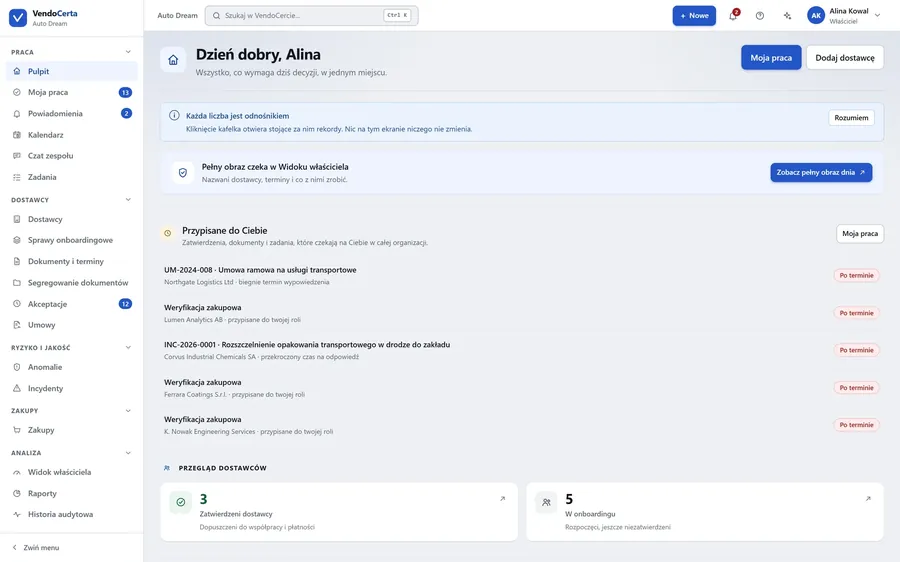
VendoCerta dashboard: the Work, Vendors, Risk & quality, Purchasing and Analysis menu; what needs a decision today, assigned tasks and a vendor overview

Dashboard — Work, Vendors, Risk & quality, Purchasing and Analysis in one menu

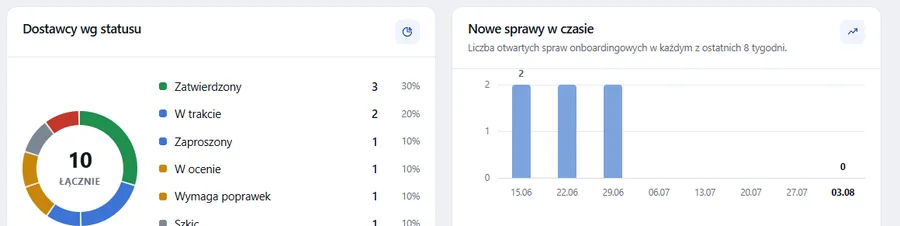
Dashboard charts: vendors by status, and new onboarding cases over time

Dashboard — the whole system, at a glance

The Work, Vendors, Risk & quality, Purchasing and Analysis sections all sit in one menu. The dashboard shows what needs a decision today, next to a panel breaking vendors down by status and new cases over time.

  • Every number is a link — clicking a tile opens the records behind it, changes nothing
  • My work, notifications, calendar, team chat and tasks — without switching apps
  • A real screenshot from the pilot environment (demonstration data)
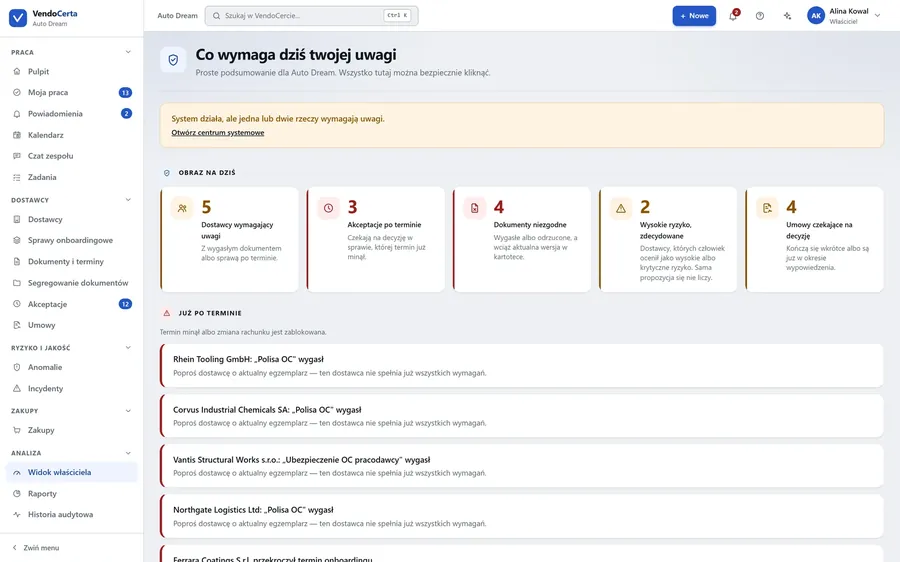
VendoCerta owner view: what needs attention today, vendors needing attention, overdue approvals, non-compliant documents, contracts awaiting a decision

A real screenshot from the pilot environment (demonstration data)

Owner view — "what needs me today"

One screen answers, in plain sentences, what needs a decision: vendors needing attention, overdue approvals, non-compliant documents, high risk, contracts awaiting a decision. The technical detail sits behind a separate disclosure, never blocking the view.

  • Plain sentences, not error codes — "The system is running, but one or two things need attention"
  • A single-file export with everything: vendors, cases, documents, audit entries
  • Permissions checked on the server — hiding a button is not security
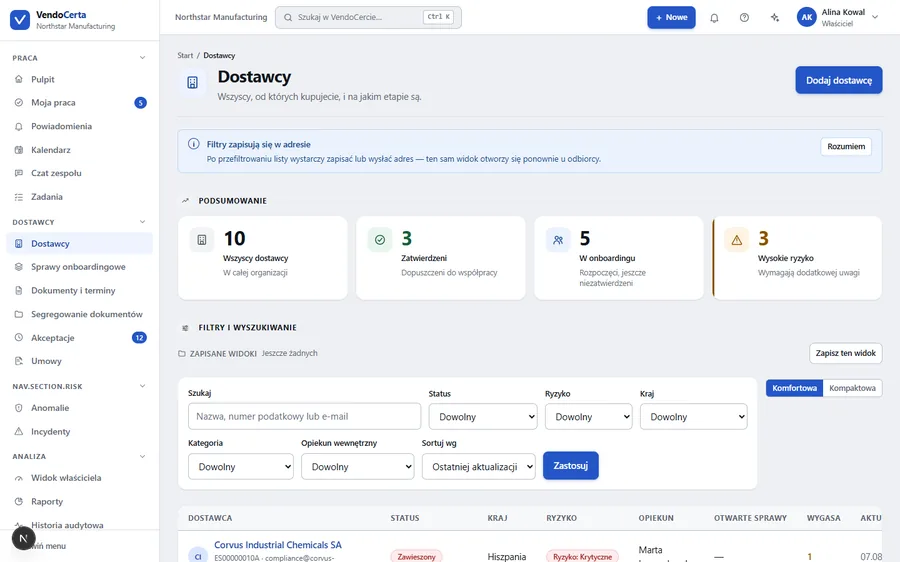
Vendor register: summary, filters by status, risk, country and owner, a table with open cases and expiry dates

Vendor register — filters save into the address, ready to send a colleague

Vendors, not rows in a spreadsheet

Every vendor carries a status, a risk level, an internal owner and a case history — search by name, tax number and e-mail, filters by status, risk, country and category.

  • The "High risk" tile counts vendors needing extra attention, not just a red label
  • Changing a vendor's bank account needs two independent approvals and a phone callback to a number already on file — never a number supplied with the change itself
  • A compact and a comfortable view — the table starts above the fold at a 900 px window
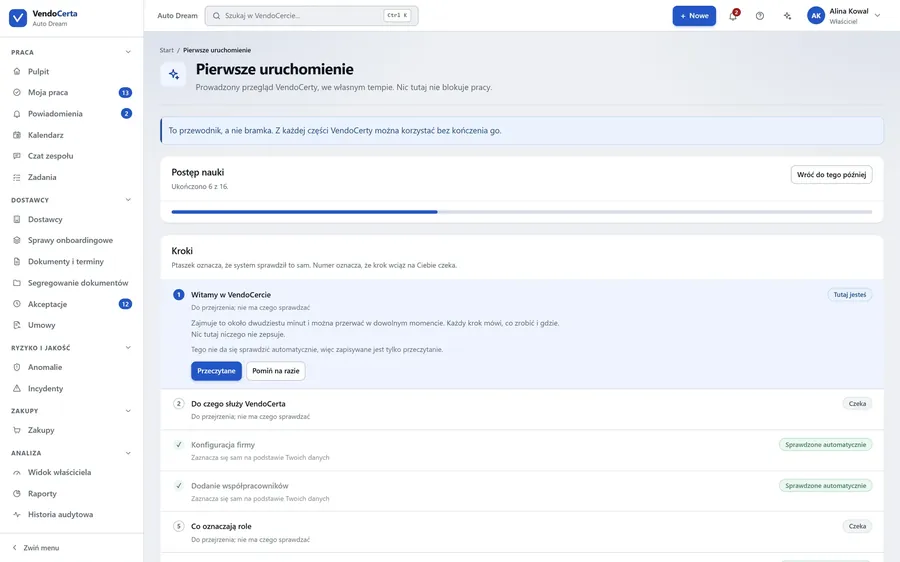
VendoCerta first-run guide: learning progress, steps to complete, company and colleague setup

The first-run guide — "a guide, not a gate"

Getting started without an IT department

A guided walkthrough at your own pace, step by step — any single step can be used without finishing the rest. Setting up the company and adding colleagues checks itself off automatically, based on your own data.

  • Five ready-made templates: standard supplier, IT services provider, construction subcontractor, high-risk vendor, sole contractor
  • Editing a template never rewrites a case already in flight — requirements are copied at the moment it is created
  • Human-readable errors: "Could not reach the database. The system will keep retrying."
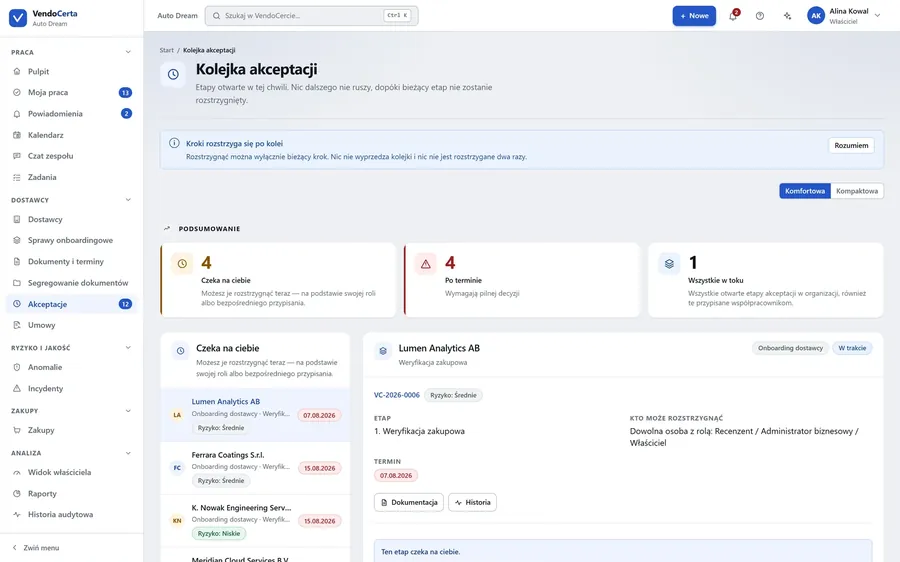
Approval queue: steps waiting for a decision, overdue and in progress, with the step, deadline and the people allowed to decide it

Approval queue — steps are decided in order, never twice

Approval gated by facts, not opinion

The system refuses to complete an approval while a mandatory field is empty, a mandatory document is missing, rejected or expired, or an earlier step is undecided. A reviewer cannot wave something through by clicking harder.

  • Named steps in order, with the roles allowed to decide and a deadline
  • APPROVED status is reachable only by closing the onboarding case
  • A reviewer can request a correction with their own comment, visible to the vendor
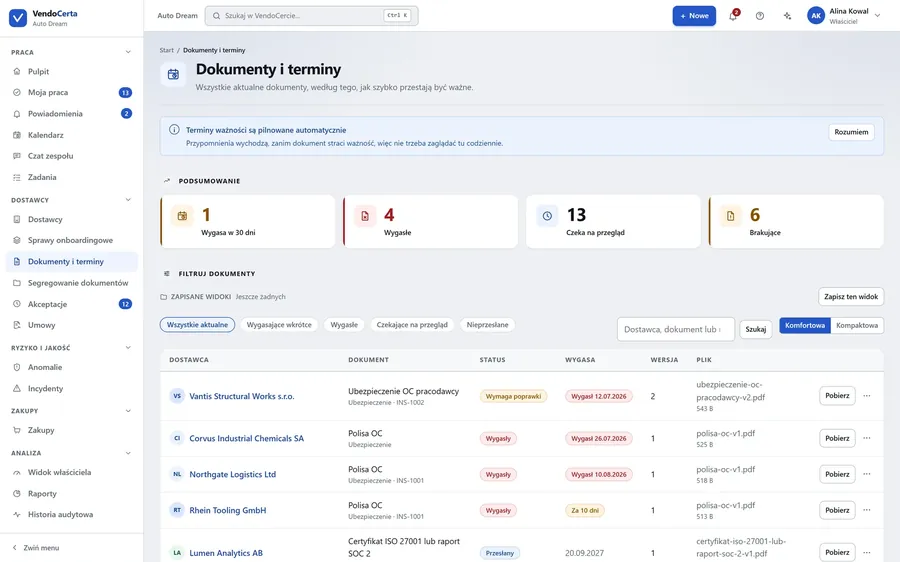
Documents and deadlines: expiring, expired, awaiting review and missing documents, with a version column and status

Documents & deadlines — every document carries a version number

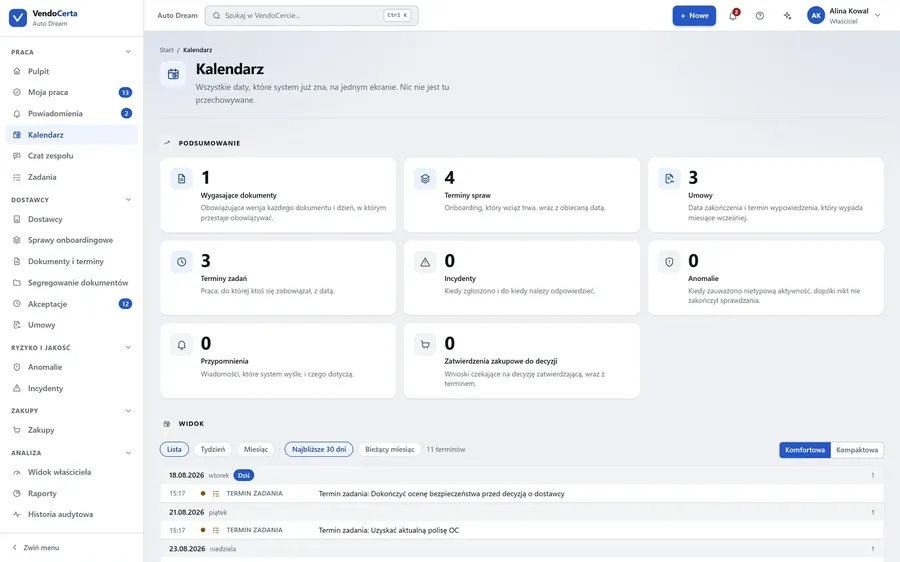
VendoCerta calendar: every deadline for documents, cases, contracts and tasks on one screen

Versioning and a calendar, not guesswork

Replacing a document makes it version 2 — the original stays exactly as it was. The calendar gathers every date the system knows about on one screen: expiring documents, case deadlines, contracts and tasks.

  • Reminders at 30, 14, 7 and 1 day before expiry, on the day, and the day after
  • Every reminder carries a deterministic key — a restarted process never sends it twice
  • Filing company documents (e.g. invoices) by year, month and company — offline OCR, every suggestion needs confirming
  • An expired document blocks a vendor's re-approval
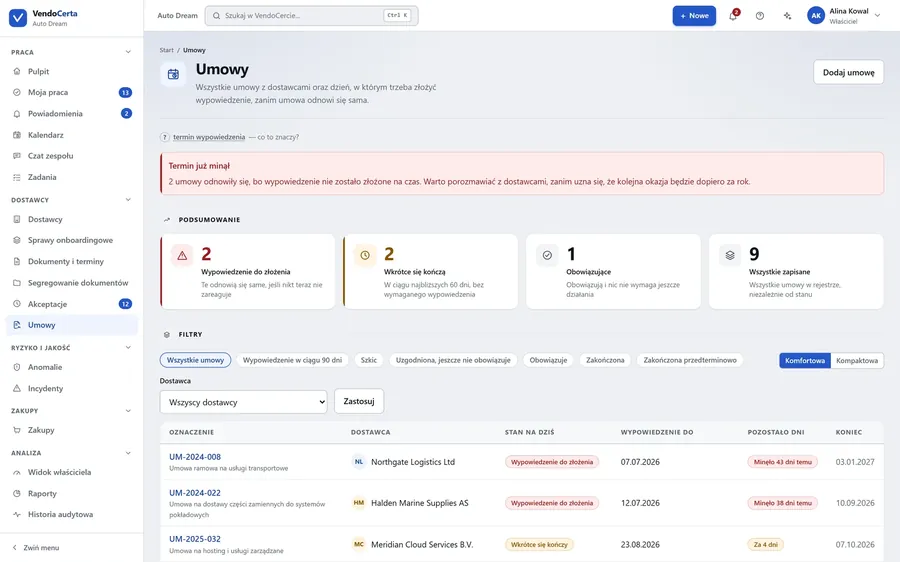
Contracts: a register of vendor contracts, termination deadlines and state (notice due, ending soon, in force, ended)

Contracts — the termination deadline, visible before a contract renews itself

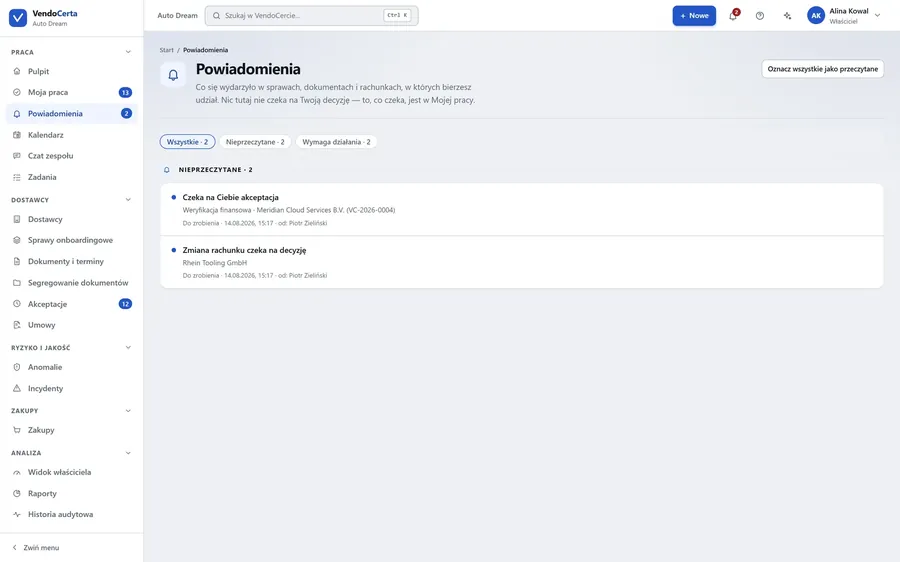
VendoCerta notifications: cases, documents and accounts you are involved in

Contracts that don't quietly renew themselves

The vendor contract register shows the day notice must be given, before a contract renews itself — with filters by state (notice due within 90 days, in force, ended early). Notifications keep the focus on what genuinely waits on your decision.

  • A "Deadline already passed" warning when notice was not given in time
  • A counterparty register, an invoice register and purchase requests — beyond vendor onboarding itself
  • Notifications split into unread and needing action
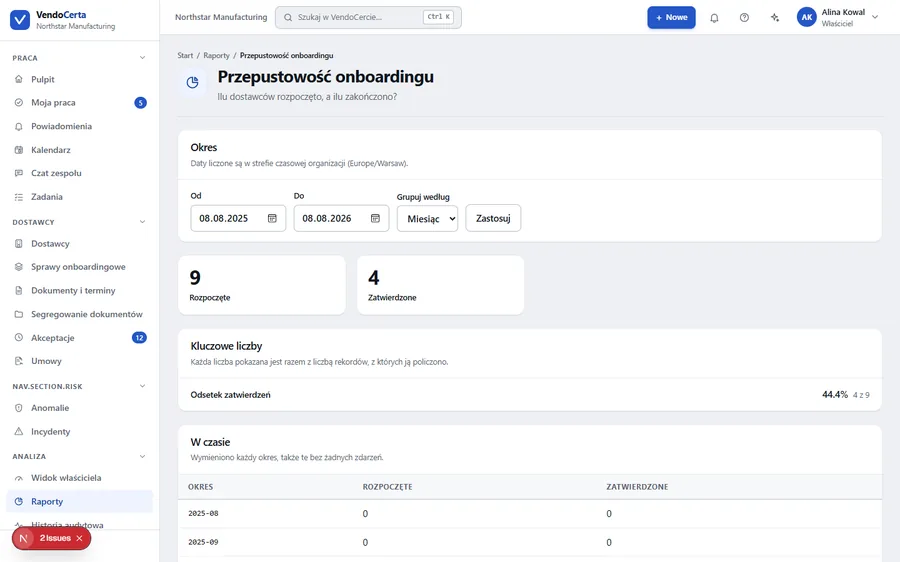
Onboarding throughput report: date range, number of cases started and approved, approval rate with the record count, a table over time by month

The "Onboarding throughput" report — a real screenshot

Reports with a number, not just a number

Every number in a report stands next to the record count it was computed from — an approval rate shows both the result and "how many out of how many" together, not separately. The date range, monthly grouping and the "over time" table list every period, including the ones with no events at all.

  • Dates counted in the organization's own time zone, not UTC
  • The owner view and the audit trail read the same data as the report
  • An organization export is available even when a module is locked by the license
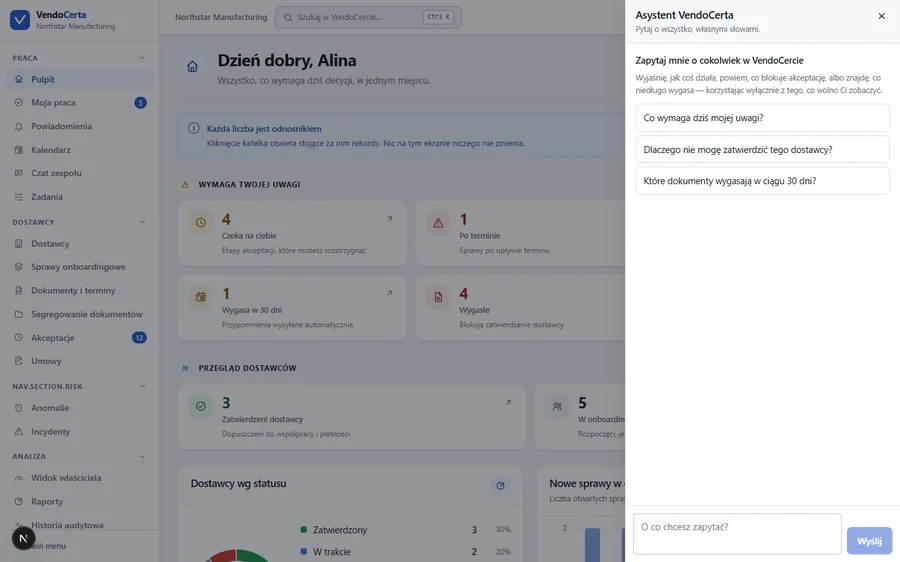
VendoCerta assistant: questions suggested from the screen's context, a field for your own question

The VendoCerta assistant — asks, explains, never decides

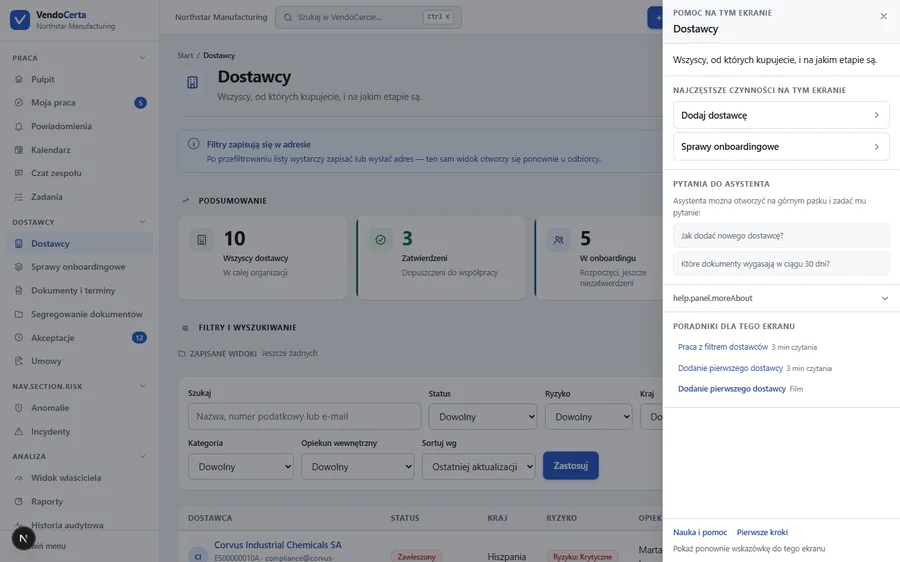
Help on this screen: the most common actions, questions for the assistant and guides matched to the Vendors screen

An assistant that asks instead of clicking for you

Three kinds of question, in the order they actually get asked: how do I… — answered from the product manual, with a link to the right screen; what is going on with… — answered from your own data: what blocks an approval, what expires, what waits on you; and can you do it for me — it writes the change down and stops. A person reads it and confirms it, and only then does anything happen.

  • Not an approver: it cannot approve, reject or suspend a vendor, change a role, or delete anything
  • No SQL and no shell; every query is scoped to the asker's own organization
  • Runs with no API key, account or network — a hosted model can be switched on, off by default
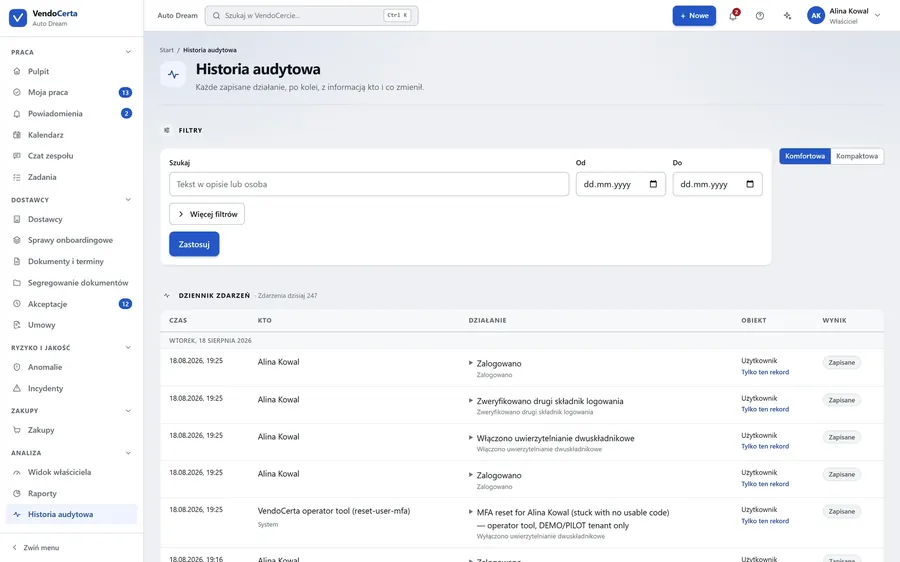
Audit trail: an event log with time, who, action, object and outcome columns, every recorded action in order

Audit trail — 247 events today alone, in this example

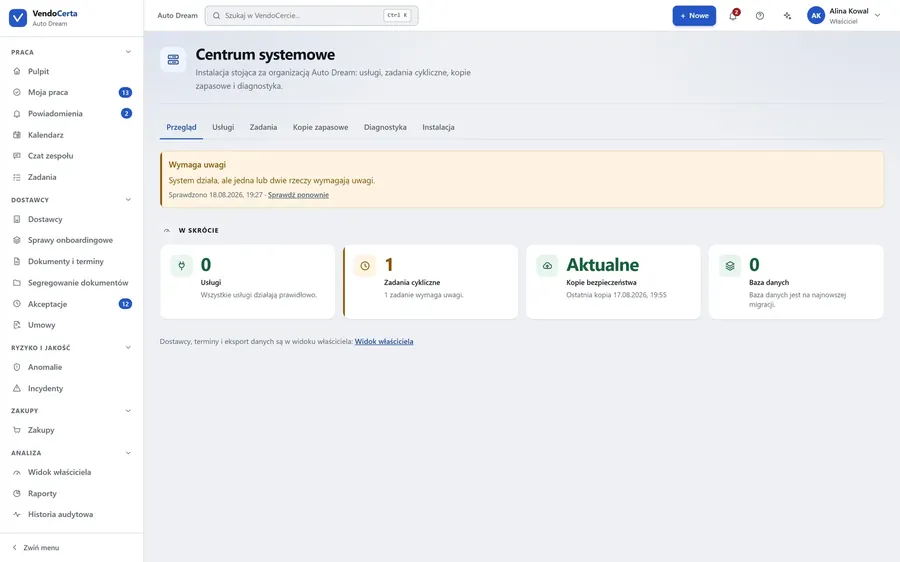
VendoCerta system centre: services, scheduled jobs, backups and diagnostics

A history that cannot be overwritten

Every action — including a denied access attempt — lands in an append-only log: who approved or changed what, and when. There is no edit or delete path for an audit entry anywhere in the code. The system centre watches over services, backups and diagnostics for the installation itself.

  • Filtering by person, date and event description
  • Backups and restore available to the Owner role
  • A support report with no passwords, tokens, document contents or vendor personal data
How it works

From invitation to Approved

APPROVED status is reachable only by closing the onboarding case — a direct status change on the vendor record is refused, with an explanation.

An administrator creates the organization

Adds colleagues and picks an onboarding template for the vendor class.

Opens a case and sends an invitation

The vendor gets one personal, expiring link — no account, no password.

The vendor fills in the form

Sees only their own progress, what's outstanding, and any correction requested.

A reviewer checks the documents

Requests a correction, or accepts — with no way to wave a gap through.

Named approvers decide in turn

Each step waits for its own role; nothing jumps the queue.

Approved — and the watch continues

Expiry dates are tracked from this point on, with a full record in the history.

Purchasing runs through the same approval engine — a different subject, the same rule. Today the chain stops at "approved"; RFQ, purchase orders and goods receipt are planned, not yet built.
Roles & permissions

Six roles, one rule: the server decides

Permissions are enforced on the server — hiding a button in the interface is presentation, not security. The technical administrator is kept separate from the business administrator, so an IT department can keep the system running without seeing who the company pays, or how much.

RoleWhat it does
OwnerFull responsibility for the organization: users, settings, backups, restore, the complete audit trail
System administratorTechnical upkeep of the installation: backups, diagnostics, configuration — with no view of vendors, cases, documents, approvals or bank accounts
Business administratorRuns vendors, templates and processes; cannot create or demote an owner
ReviewerChecks data and documents, requests corrections, decides assigned steps
ViewerReads permitted data, changes nothing
External vendorSees only their own onboarding form, through a personal expiring link
Three things set VendoCerta apart from a form builder: approval gated by facts, not opinion; history with no edit path; and a watch over deadlines that continues after approval — it does not end at "approved".
Security & compliance

Not a marketing claim — rules built into the code

Organization isolation

Every organization is separated at the data level; no query ever crosses between tenants.

Two-factor authentication

A time-based code as a second sign-in factor, with a throttle kept separate from the sign-in one.

Malware scanning on upload

Every uploaded file is checked by ClamAV; on by default on a fresh install.

Backups & off-site replication

An automatic daily backup, a history and a download; restoring requires typing "RESTORE" to confirm.

Global rate limiting

A limit on sign-in attempts and requests per IP address, so one machine cannot flood the system.

A GDPR readiness pack

A data inventory, a record of processing activities, a breach-response procedure and a retention matrix — ready for a lawyer's review.

Product status

A pilot with a real installation, not a mock-up

VendoCerta runs as a real installation — a single installer file with Node.js, PostgreSQL, MinIO, Mailpit and a malware scanner inside, with no Docker and no administrator rights required. The screenshots on this page come from the demonstration environment: the "Northstar Manufacturing" organization, ten vendors at different onboarding stages, documents current, expiring and expired, approvals waiting for a decision, and a realistic audit history.

Pilotwith first customers, on a trial license
8 languagesof interface — pl · en · de · fr · es · it · uk · ru
~30 peoplecomfortable ceiling for one server (25–40 concurrent)
Append-onlyaudit trail and reminder log
Honestly, about the limits: one typically-configured server comfortably handles up to 25–40 people working at once; the product has not yet had an external penetration test or a formal GDPR legal review; KSeF e-invoicing today authenticates with a token, not a certificate.
Deliberately outside this version

Full contract lifecycle management, paid sanctions screening, automated risk scoring, the purchasing steps after a request is approved (RFQ, purchase orders, goods receipt), automated bank-account ownership verification (Verification of Payee), ERP integration, a native mobile app, an ERP of its own, and a supplier marketplace. The architecture leaves room for these — none of it is faked.

The data in the screenshots is fictional

All demonstration data shown on this page is invented. No real company, person, address, tax number or e-mail address appears anywhere in these materials. The passwords used in the demonstration environment are for a local pilot only and are not published here.